Windows 10/11 · Steam ARK: Survival Evolved
The editor
Your crosshair.
Your rules.
Crosshair · Editor
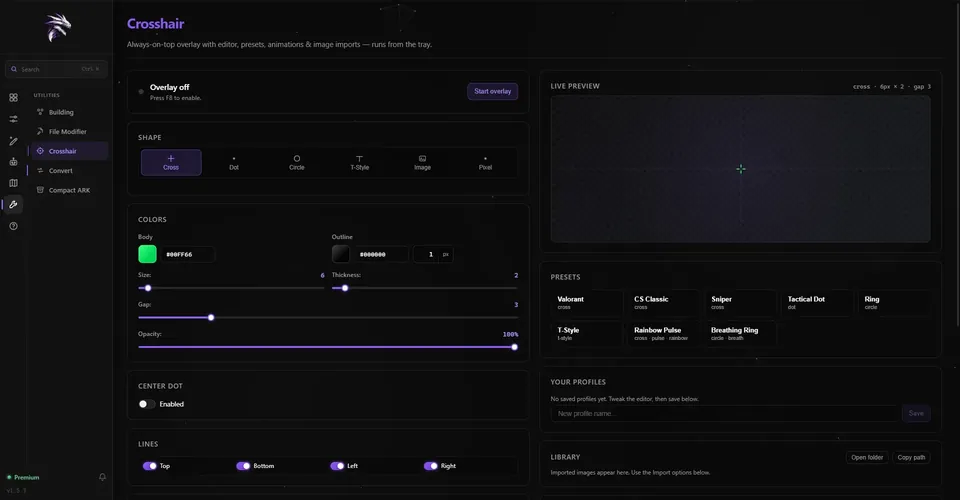
Build it the way you aim.
Pick Cross, Dot, Circle, T-Style, Pixel art or your own image. Set size, thickness, gap, opacity and
rotation, choose body and outline colours, add a centre dot and switch each of the four lines on or off.
The live preview shows every change.
Beyond the shape
More than a dot.
-
Motion
Animations
Pulse, Breath or Rotate at the speed you set, and a Rainbow colour cycle on top.
-
Library
Presets & profiles
Start from 8 built-in presets, save your own as profiles, and import images or videos into your library.
-
Sharing
Crosshair codes
Copy any crosshair as an RR1- code, or paste a friend’s code to get the same look. An image crosshair has
no code: the picture stays on your PC.
-
Placement
Any monitor
Choose the monitor, nudge the crosshair with an X and Y offset, or recenter it.
-
Hotkey
F8 and the tray
F8 toggles the overlay by default, globally, even while ARK has focus. The overlay runs from the tray.
-
Window mode
Fullscreen
Windowed Fullscreen always works. Over Fullscreen, the crosshair shows only while Windows’ fullscreen
optimizations are on for ShooterGame.exe.
How it works
Three steps to
on target.
-
01
Download
Get RazorReaper free for Windows 10 or 11 and install it. It lives in your tray.
-
02
Design it
Open Crosshair in the Utilities group, then build your own, pick a preset or paste a code.
-
03
Turn it on
Press Start overlay or F8, then play ARK in Windowed Fullscreen.
Does the crosshair show in fullscreen?
Over Windowed Fullscreen, always. Over Fullscreen, only while Windows’ fullscreen optimizations are on for
ShooterGame.exe. The Crosshair page tells you when ARK is set to Fullscreen and can switch it to Windowed
Fullscreen for you while the game is closed.
Can I share my crosshair?
Yes. Copy it as a code that starts with RR1- and anyone can paste it into RazorReaper. The code carries
the look only: your monitor and offset stay as they are. Image crosshairs have no code.
Does the overlay change ARK’s files?
No. The crosshair is drawn in its own always-on-top window. Only the optional switch to Windowed
Fullscreen edits GameUserSettings.ini, and only while ARK is closed.
Is the crosshair free?
Yes. The crosshair overlay has no monthly limit in the free version.

Your crosshair.
Free to try.
Free to download. Premium when you want more.
Windows 10/11 · Steam ARK: Survival Evolved